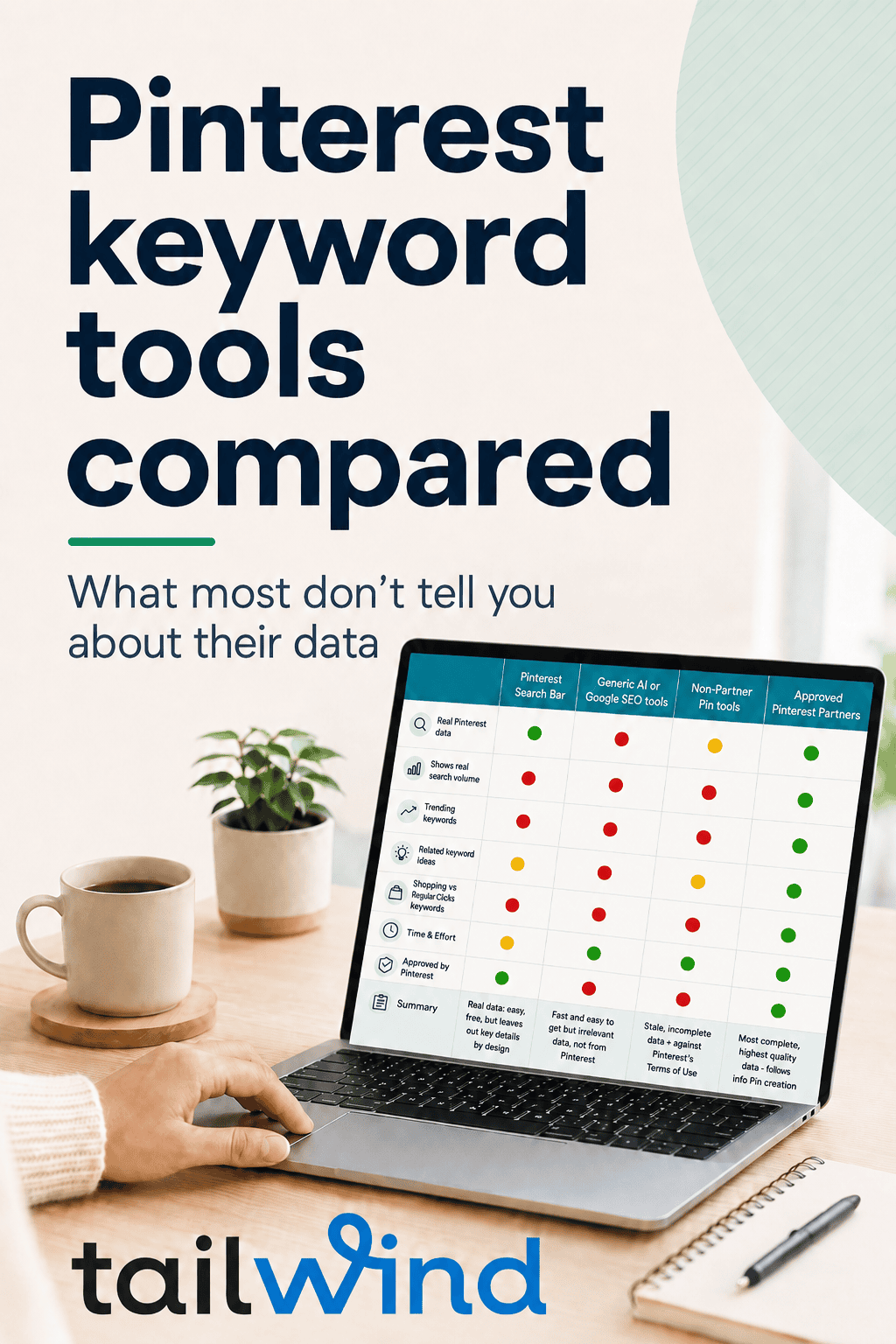
Not all Pinterest Keyword Data is Good
Google “best Pinterest keyword tool” and look closely at what comes back.

Here’s what that results page can’t tell you: the top tools it recommends have no real Pinterest search data. Not “less” data — none. Google ranks pages, not data access, so it has no way to distinguish a tool built on Pinterest’s actual search data from one repackaging guesses. You have to know the difference yourself. That’s what this comparison is for.
Most Pinterest courses teach you to hunt for keywords manually in the Pinterest search bar. There’s a historical reason for that: for years, Pinterest keyword data simply wasn’t available to any third-party tool. In that void, a number of tools positioned themselves as Pinterest SEO tools anyway — but nearly all of them either have no real Pinterest search data at all, or stale, stolen data they pass off as good. If you want real results on Pinterest, your process has to start with real data — not proxies, and not someone’s scraped copy of old search suggestions.
Below: every option sorted into four honest buckets — including doing it by hand, and including us — plus a three-question test you can run on any tool anyone ever recommends to you.
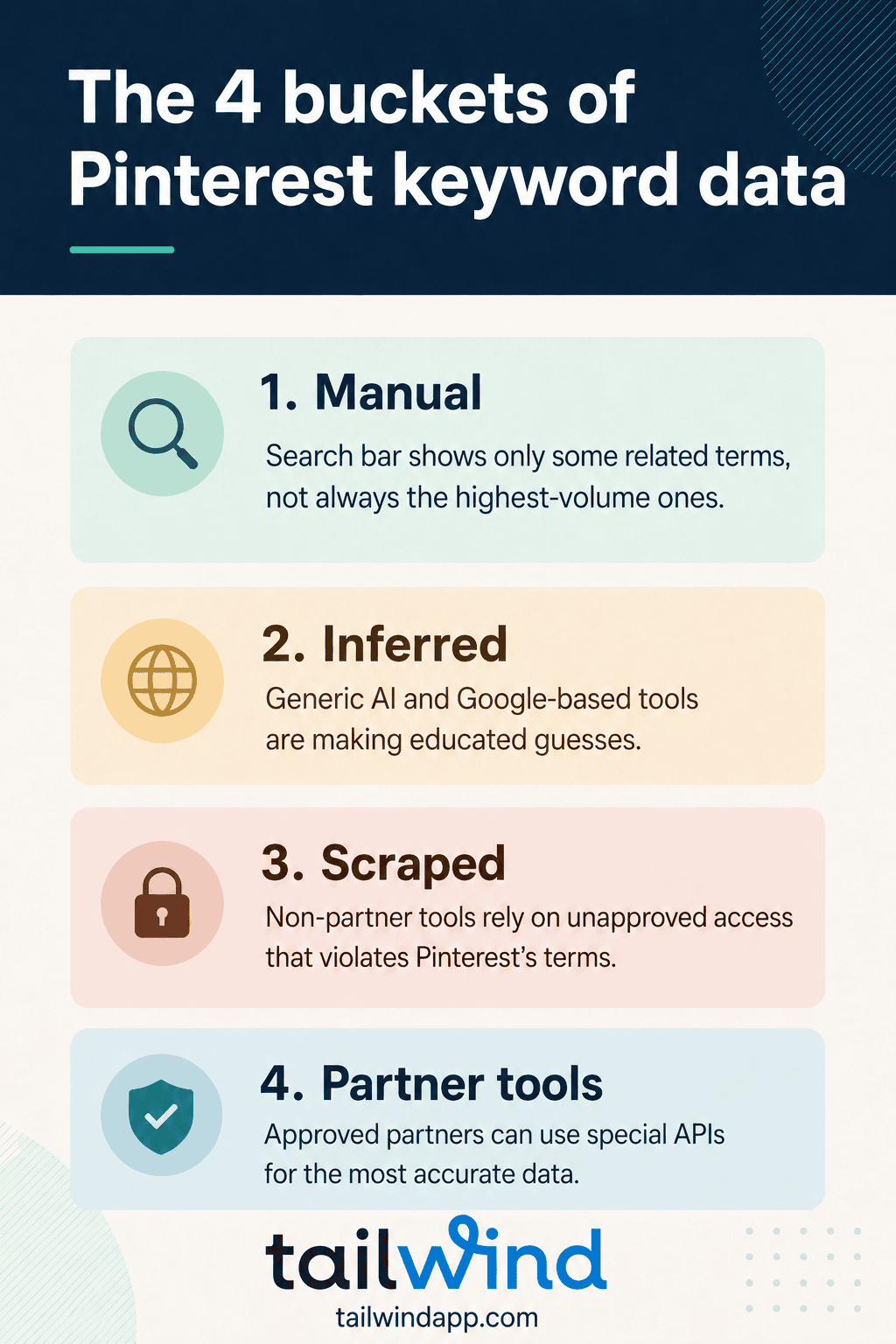
Every Pinterest Keyword Source Falls Into One of Four Buckets
Strip away the branding and every way of researching Pinterest keywords comes down to where the data originates:
1. Manual research (the Pinterest search bar). Type a topic, study the autocomplete suggestions, write them down, repeat. It’s free, it’s genuinely Pinterest, and it’s what most courses teach. Two problems show up fast. The first is the one that breaks most people: it’s incredibly time-consuming — an afternoon of typing and note-taking to rough out what a data tool shows in seconds, then the same again for your next topic, and the next, forever. The second is quieter but costlier: the search bar only surfaces a small set of suggestions, so the best keywords often never appear at all, no matter how long you hunt.
2. Inferred from the open web — in plain terms, guesses. Tools that take Google numbers and dress them up as “Pinterest volumes,” plus generic AI. Ask ChatGPT for Pinterest keywords and it answers instantly and confidently — but it’s guessing. It learned from the open web, not from Pinterest’s search data, so it has no way to know what people actually search on Pinterest. Its answers will be wrong more often than not, and you have no way to tell which ones.
3. Scraped data — access Pinterest doesn’t allow. Tools that harvest Pinterest’s public interface — mostly the same autocomplete suggestions you can see yourself — and repackage it as “keyword data.” Two things to know. First, scraping isn’t permitted under Pinterest’s terms — these tools collect data in a way Pinterest doesn’t allow. Second, many aren’t honest about how they get it: some admit the autocomplete-mining in their own marketing, while others stay vague about their sources or imply official access they don’t have. The simple defense: Pinterest publishes an official list of approved partners. Check it before you connect anything to your Pinterest account — and don’t use tools that aren’t on it.
4. Partner data. Approved access to Pinterest’s actual search data through an official developer partnership — real volumes, trending status, and shopping-vs-idea intent, from Pinterest itself — and the keywords you save flow straight into Pin creation. This is the category Tailwind’s Keyword Research is in, and we’ll hold it to the same scrutiny as the others.
A note on what we won’t do here: name specific competitors and pick them apart. The categories are verifiable and you can place any tool in one yourself — usually just by reading how it describes its own data.
The Comparison That Actually Matters
| Manual (search bar) |
Inferred (Google-based tools, ChatGPT) |
Scraped Non-Partner Tools |
Partner data (e.g., Tailwind Keyword Research) | |
|---|---|---|---|---|
| Where the data comes from | Pinterest’s own search bar | The open web — not Pinterest | Pinterest’s search bar, harvested by a bot | Pinterest’s search data, via approved partner access |
| Real Pinterest search volumes? | No — suggestions carry no numbers | No — guesses | No — volumes are old, stale scraped data |
Yes |
| Shows what’s trending now? | No | No | No | Yes |
| Shopping vs. idea searches? | No | No | No | Yes |
| Related keyword ideas? | Some — a limited set | No — invented associations | Some — a limited set | Yes — related keywords and clusters |
| Stays current when Pinterest changes? | Yes — it’s the live UI | No — never connected in the first place | No — and you won’t know it broke | Yes — updates with the platform |
| Allowed by Pinterest? | Yes | Yes – since they don’t use Pinterest data | No | Yes — approved and reviewed |
| Cost | Free —but hours of your time over and over again | Free–cheap | Paid – often higher cost than Tailwind! | Paid – limited free access to start |
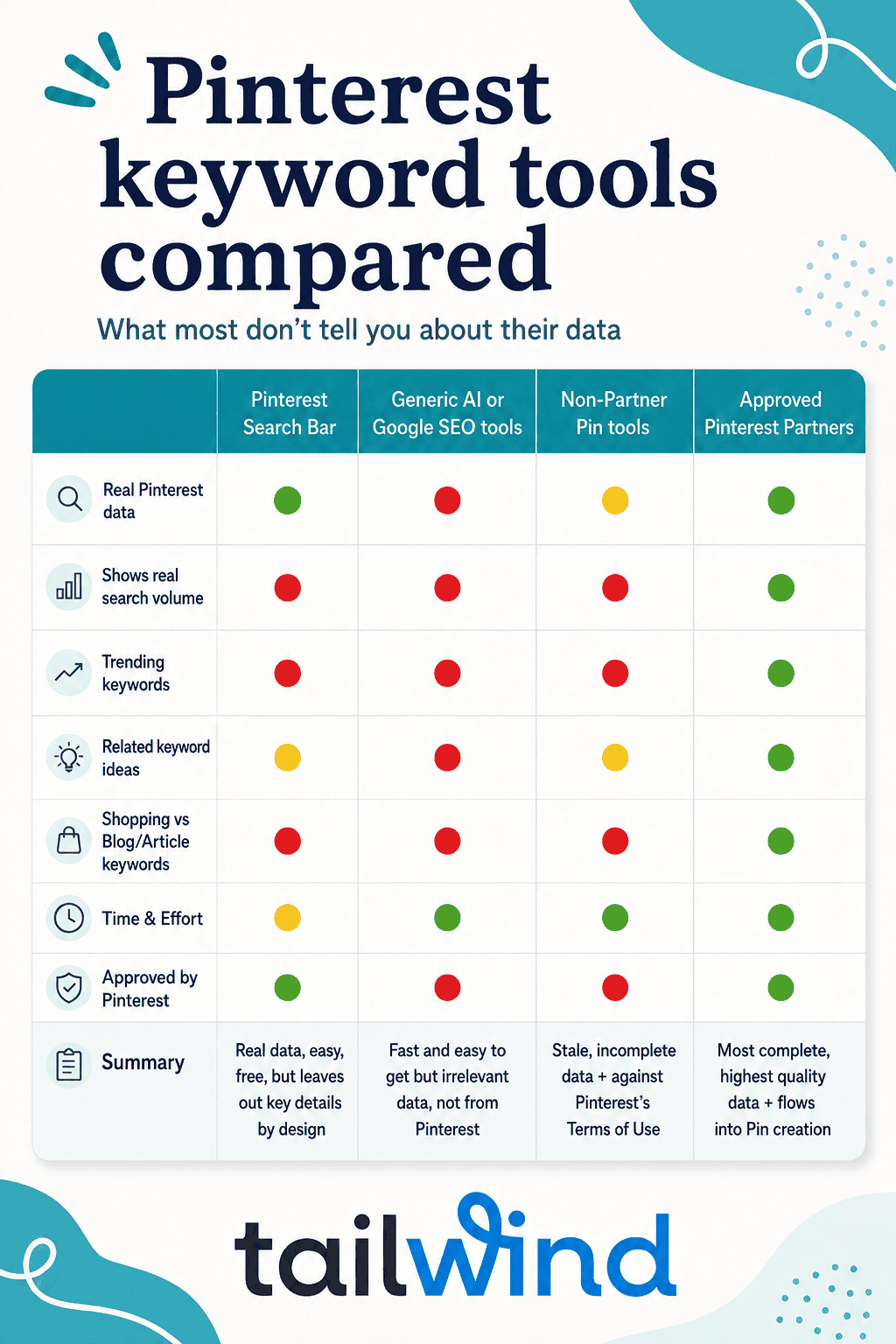
Two key takeaways from that table:
First, manual research is the best free option whose data is actually Pinterest’s — if Pinterest is still an experiment for you, it’s a legitimate place to start, as long as you’re honest about the hours it eats. (Worth knowing: Tailwind’s Keyword Research includes limited free access too — the same real data, minus the afternoon of typing.)
Second, every method except partner data shares one blind spot: none of them show actual, current Pinterest search volumes or intent. Manual research is at least honest about it — the paid alternatives differ mainly in how convincingly they hide it.
Why the Search Bar Isn’t Enough
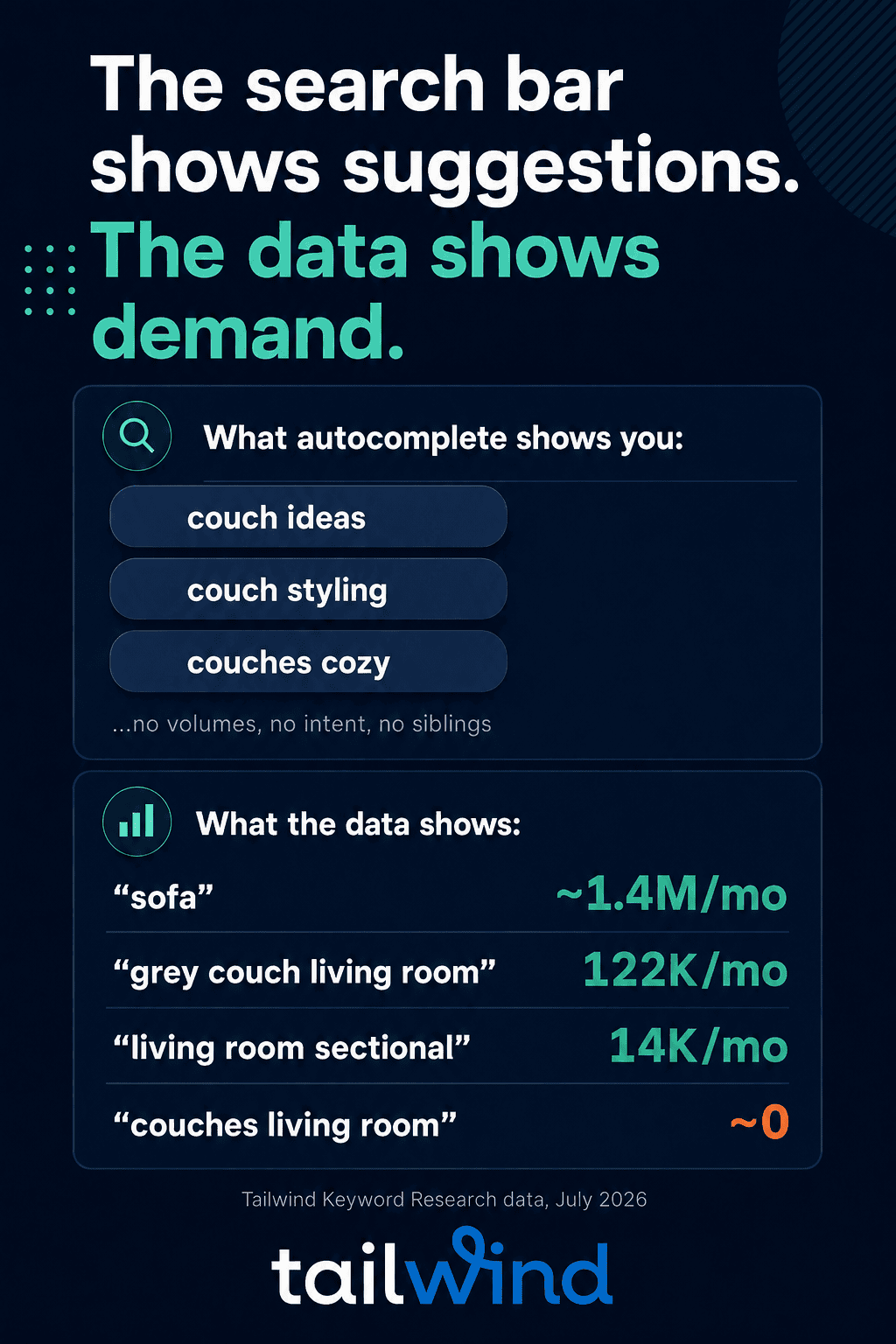
Here’s what changed our own understanding of this: Pinterest’s suggested search refinements — the autocomplete chips — surface only a slice of the demand in the interest graph. In our data, most high-volume, granular terms never appear in those suggestions at all.
The example in our complete guide to Pinterest SEO shows this: “couches living room” registers no meaningful volume, while the sibling phrasing “grey couch living room” carries 122K monthly Pinterest searches — and the synonym “sofa” carries ~1.4M (July 2026 data).
None of that hierarchy is visible from the search bar. Which means the manual “search bar” method misses the biggest opportunities and can’t tell you which phrasing to pick.
And that’s before you count the hours of time it takes. Hunting by hand costs an afternoon per topic to produce a less complete answer than real data returns in seconds — which is exactly where the manual method falls apart for most people, even before they discover what it never showed them.
That’s the ceiling on buckets one, two, and three. It’s not that they’re useless. It’s that they can only show you what’s visible from the outside.
The search bar shows suggestions. The data shows demand.
“Can’t I Just Use ChatGPT?” — Taking the Question Seriously
It’s the most reasonable objection in the room: ChatGPT is free-ish, fast, and confident, even when it’s wrong. For some workflows it’s genuinely good — brainstorming content angles, summarizing web research, proof-reading posts.
For deciding what to target and which content angles should be pursued, ChatGPT (and other LLMs) are actually quite bad.
The reason: an LLM trained on the open web is guessing based on mostly non-commercial data, while Pinterest search is highly commercial.
Pinterest reports 80B+ monthly searches, roughly half commercial in nature (Q1 2026 earnings call).
By ChatGPT’s own data, only about 2% of its prompts are commercial. So, it is trained on primarily non-commercial data. ChatGPT can tell you which keywords appear most on the open web, but has no idea what people are searching for on Pinterest.
And just like the videos you’ve seen where ChatGPT tells people December is spelled with an X – or can’t count to 10 – it will confidently tell you the wrong answer, every time. This wastes your time and effort by directing you at the wrong opportunities, even if it feels good to have some direction to follow.
Confidence without data is exactly how you end up targeting “couches living room” instead of “grey couch living room” or “sofa”, which have much bigger audiences.
The pragmatic answer:
Use real Pinterest data from an Official Partner tool to help you decide which keywords to pursue, which content to create and how to optimize your Pins.
Use AI to help you research, draft and review content, speeding up the creation process.
That’s the whole workflow behind AI-assisted Pinterest marketing as we practice it — AI is a tool inside a Pinterest-results workflow, not a replacement for one.
What “Official Partner” Actually Buys You
Tailwind is Pinterest’s longest-standing official developer partner — and the partnership itself is verifiable: open Pinterest’s business partners directory, look under the Content category (you may need to click “view more partners”).
Boom. There we are.

Run that check on any tool before you connect it to your (or a client’s) Pinterest account — it takes a minute, and if a tool claims Pinterest data but isn’t on that list, that’s your answer.
What the partnership means in practice:
- The data is Pinterest’s data. Volumes, trending status, and shopping-vs-idea intent come from approved access to Pinterest’s search data — not estimates, not autocomplete-mining.
- The integration is reviewed. Pinterest holds partner integrations to high standards. Your account and your clients’ accounts run through something Pinterest has actually vetted — which matters to keep you accounts and data secure, avoid penalties, avoid breakages in your workflow and adjust quickly whenever Pinterest changes something.
- Accountability has an address. When the platform evolves, a partner integration updates with it. An unapproved tool just quietly breaks — with no way for you to know it has.
“When you connect a tool to your Pinterest account, you’re handing it the keys. It’s worth knowing whether that tool is actually sanctioned to be there — or just someone looking to make a quick buck.”
— Danny Maloney, co-founder & CEO of Tailwind
Using an unapproved tool doesn’t mean your account is instantly doomed, but there have been periods of cracking down in the past, as well as unapproved tools doing things they shouldn’t like selling users’ data. Enforcement may not be instant, but when it comes it happens unexpectedly and can impact months or years of hard work. The facts are what they are — scraping isn’t permitted under Pinterest’s terms, the access is unreviewed, and nobody is accountable when it breaks. If you manage Pinterest for clients or an employer, that calculation isn’t only about your account; it’s about brands you’re paid to protect.
And what partner data doesn’t buy you, stated equally plainly: judgement. No tool — ours included — decides whether “sofa,” “living room sectional,” or “grey couch living room” is right for your content. Real data shows you accurate options to make that call possible; it doesn’t make it for you. If a tool promises it’ll run your whole Pinterest presence hands-off, that’s a different problem: Pinterest’s developer terms don’t allow full automation, requiring a human to review and choose each Pin that publishes.
How to Evaluate Any Pinterest Keyword Tool in Three Questions
- Where does the data come from? Look for the words. “Autocomplete,” “suggestions,” “based on Google data,” or silence = the tool is guessing or using stale, scraped data. “Official partner” on the directory = Pinterest has reviewed this tool and approved it for official, non-public access as a partner.
- What can the data actually tell me? Volumes per keyword? Trending status? Shopping vs. idea searches? If it can’t show those, it’s showing you guesses, not the actual demand for content and products on Pinterest.
- What can’t it tell me? Every honest tool has an answer. (Ours: it can’t yet pick your keyword for you, and volumes are living numbers, a zero needs interpretation as it may just not be a graphed term, etc.)
A tool that fails question 1 can’t really answer question 2. And a vendor that has never thought about question 3 is telling you something too.

Where This Leaves the Comparison
If you take one thing from this piece: “which Pinterest keyword tool is best” is a data-source question before it’s a feature question. Features are comparable on any pricing page. Data source decides whether the numbers you act on are real.
- Just exploring? The search bar method is free and a genuine view into a slice of Pinterest data — it’s fine for a first look if you can spare the hours. Limited free access to Tailwind’s Keyword Research gets you the same first look from real data in minutes, and let’s you learn a more sustainable long-term workflow.
- Using AI already? Keep it for drafting (Ghostwriter and SmartPin do this also inside the Tailwind workflow, from your saved keywords); don’t let it pick targets for you, since it doesn’t have the data to make the right decisions. You can also use the Tailwind MCP server to easily hook scheduling and publishing into your AI workflows.
- Ready to decide from real numbers? See what real Pinterest data looks like for your niche — search the topics you think you know. The gap between what you’d guess and what people actually search is usually visible in the first five minutes, and evaluating us against our own three questions is exactly what we’d want you to do.
Pinterest Keyword Tool FAQs
Can I use ChatGPT for Pinterest keyword research?
No — not for choosing targets. ChatGPT has no access to Pinterest’s search data; it guesses confidently from open-web word frequency, and the answers are nearly always incorrect or incomplete for Pinterest specifically. This is especially for newer trends, since LLM training data often runs a couple of years behind. Decide with real Pinterest data form an approved partner tool.
What does it mean for a Pinterest tool to be an official partner?
It means Pinterest has approved and reviewed the tool’s functionality, privacy and security practices and decided to approve access to its platform and data at a level not available to non-partners through the public API. You can verify any tool’s claim that is an approved partner in Pinterest’s business partners directory. Tailwind is Pinterest’s longest-standing official developer partner — since 2012.
Are scraped Pinterest tools illegal?
Illegal in a criminal sense, no — but they operate in a way Pinterest doesn’t allow: scraping isn’t permitted under Pinterest’s terms, which opens the door to Pinterest enforcing against those tools and/or accounts that use them. Beyond that, the “data” is generally stale becomes scrapping data is quite expensive and time consuming, so you may be seeing data from three years ago without knowing it. The safe habit: check Pinterest’s approved-partner list and skip anything that isn’t on it — especially if you manage client accounts.
Why are some Pinterest keyword tools free?
Usually because the data is not actually Pinterest data. A number of Google SEO tools saw an opportunity to rank for Google searches related to Pinterest keywords and stood up a new page on their site, where they show Google search data but claim it’s Pinterest. There’s no cost to them to do this, so they use it as free lead generation for their Google SEO business. Unfortunately, this tends to not be made clear to the user, leading people to spends months creating content content pointed at keywords that never had real Pinterest – costing both time and missed growth opportunities during the time spent chasing the wrong topics.
How can I tell where a Pinterest keyword tool gets its data?
Read how it describes itself — anything short of being listed in Pinterest’s official partner directory means the tool is either not showing you Pinterest data, or using sale, scrapped data that they are not approved to access or provide. Most of these vendors will not tell you this, or will intentionally try to talk around it by stating they’ve been approved for public API access (which does not include any keyword data). When in doubt, apply the three questions above: where does the data come from, what can it tell you (volumes? intent? trends?), and what does the vendor admit it can’t do. If the answers are vague, you have your answer.
Related Resources
- Pinterest SEO in 2026: The Complete Guide to Getting Found in Pinterest Search
- Tailwind Keyword Research (real Pinterest data)
- Free Pinterest Keyword Tool
- The Tailwind 2025 Benchmark Study (1.2M+ Pins)
- Yes, Descriptions Still Matter for Pinterest — Here’s Why
- How to Write the Best Pinterest Descriptions
- Pinterest Board Ideas: Names That Get Found
- Pinterest Isn’t a Social Network — It’s a Search Engine
- Pinterest SEO Course (free)
- What Is Pinterest SEO? (course)
- Pinterest Profile Checklist
- The Ultimate Pinterest Image Size Chart
- What Makes a Pin Go Viral
- Board Title Idea Generator (free tool)